
Simple, secure email automation
Email automation for advokatkontorer with LexLogik Mail
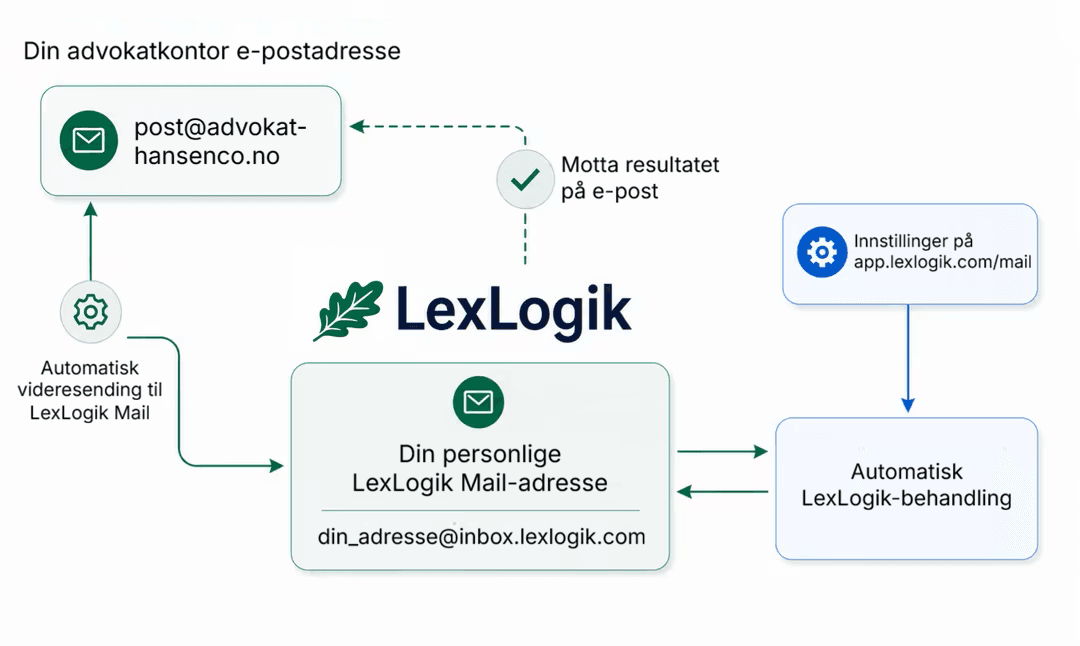
E-postautomatisering for advokatkontorer med LexLogik Mail. Med LexLogik Mail får du en personlig adresse på inbox.lexlogik.com. Videresend innkommende e-poster dit - LexLogik henter ut vedlegg automatisk og behandler dem som en manuell opplasting. Original-e-posten forblir uberørt.
Kort oversikt
- Your own address at inbox.lexlogik.comYou receive a personal destination address at inbox.lexlogik.com - a dedicated intake for automated preparation of client attachments.
- Automation via forwardingForward emails from Outlook, Apple Mail, or Thunderbird. LexLogik detects attachments immediately and starts processing - without you having to open the app manually.
- Results by email and in the appFinished PDFs arrive as a reply email or via a secure link. All documents are also ready in the app.
- Privacy and hosting in GermanyProcessing takes place exclusively on servere i Tyskland - discreet, instruction-bound, and legally sound.
From inbox to processing
Inbound attachments are extracted automatically and follow the same path as a manual upload: tekstgjenkjenning, combine, export. Your original email stays untouched in your usual mailbox.
Prefer to upload directly?
Drag attachments into the Optimize area - the flow is identical, without a mail step in between.
Set up a forwarding rule and you are done
You get the most from LexLogik Mail when you set up a rule in your email program: all incoming emails with attachments are automatically forwarded to your LexLogik address, processed there, and ready immediately. The example below follows Microsoft Outlook - comparable in Apple Mail or Thunderbird.
Betingelse
Videresend alle e-poster med vedlegg
Måladresse
[din-adresse]@inbox.lexlogik.comUnntak
Typisk avsenderadresse for resultatvarsler - tilpass til dine faktiske innstillinger.
Din personlige adresse finner du under Innstillinger → LexLogik Mail. Unntaket forhindrer at LexLogik-resultatvarsler sendes tilbake til LexLogik - ellers oppstår en endeloop.
Law firms shouldn't have to worry about file transfer. LexLogik Mail is our answer: the attachment comes in, the result goes out - without anyone having to open the app.
Jonas Maximilian Regul
Managing director · Strategy
Prøv LexLogik i din praksis
Alle funksjoner tilgjengelige. Ingen kredittkort. Ingen automatisk abonnement.